This post is based on my experience writing a plugin for HashiCorp’s Vault. While HashiCorp provides thorough documentation, I found that I had to read the code of several open-source plugins before I grokked a bigger picture of Vault plugin development. This is my attempt to document details that are not spelled out in HashiCorp’s basic example.
Vault Paths & Policies
Paths are a key concept of Vault. It’s fundamental to understand how they work, because Vault gets its utility and flexibility largely from the path mechanism. In fact, there’s so much flexibility that official documentation can come across as vague. Later in this post I’ll describe paths exposed by a secrets engine that I created, in an attempt to give a concrete example.
Users interact with each secret engine through a limited number of verbs (i.e. read, write, list, delete) acting on any number of paths. The specific paths may be built-in to the secrets engine, or created by a user, or a combination of both.
Within a plugin, each operation on a path is processed by a handler function. Handlers can store and retrieve data; so, a plugin can expose configuration on some paths and features on others.
Paths are closely tied to policies, the mechanism that controls which users can perform which operations on which paths. A Vault administrator defines policies which turn some users into privileged “operators”, and perhaps many more nuanced types of privileged user.
The author of a secrets engine, has to think about what features the engine supports; and, how to divide features across multiple paths - specifically so that the Vault administrator can isolate privileges to specific users. Typically, this means configuration can be performed only by privileged operators, while features can be accessed by users with different privileges.
Vault provides operators an important control over paths and plugins: the root path where the plugin is enabled (or “mounted”). The same plugin can be enabled at multiple root paths. Importantly, each of those root paths has its own storage. What’s nice about this is not only that administrators assign each path its own policies. It’s also that a plugin with only a simple set of options can serve relatively complex needs, by having multiple configurations enabled concurrently on different paths.
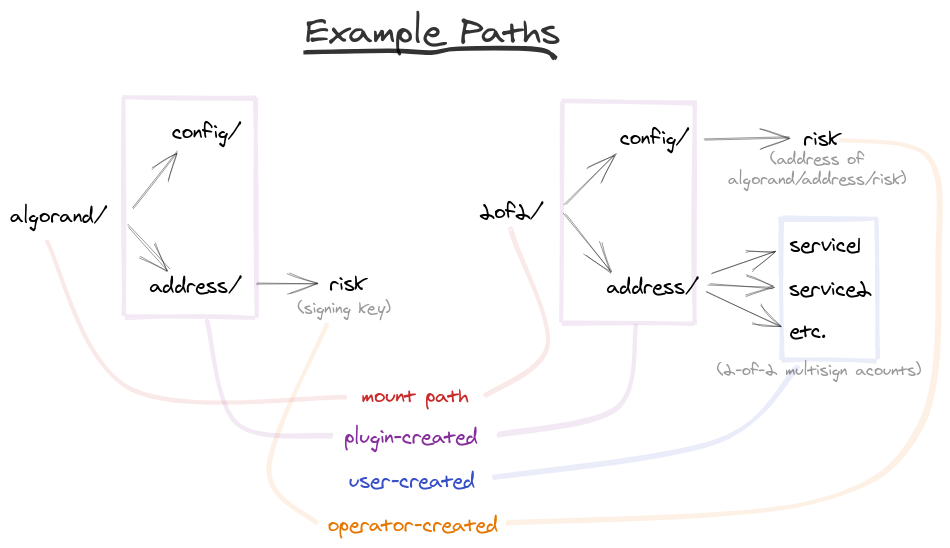
The example that follows takes advantage of this. Specifically one mount path is used to store signing keys, while another mount stores multisign accounts of a particular configuration. With this in mind, let’s look at a hypothetical scheme of signing privileges, and show how this particular Vault plugin can be configured to acheive it.
A Secrets Engine for Algorand
To illustrate, consider a secrets engine designed to sign transactions for the Algorand blockchain. The purpose of this plugin is to leverage Vault to restrict access to digital assets on a blockchain.
By design, the plugin presents functionality across multiple paths. Transaction signing takes place on algorand/address/… paths, while security settings are controlled on algorand/config/… paths. The plugin anticipates a logical separation of privilege, to make the administrator’s job easier when defining policies.
Multiple Signer Example
Let’s say a business is running multiple services, software that from time to time makes Algorand transactions. But the services are hosted on less trusted servers, so they should not manage the private keys used to sign Algorand transactions. Also, the business requires compliance checks before payments, so the services may initiate a transaction, but they must be approved by a risk department before completing.
Here’s how we’ll address each of these constraints:
Our accounts will use a 2-of-2 multisign scheme. One signature from the software service, the other from a member of the risk department.
Software services will use Vault to sign. They will have a Vault token, instead of a private signing key.
Members of the risk department will use Vault to put a second signature on each approved transaction.
Once set up, our paths will look something like the figure below.
The following Vault commands will create this setup. To follow along, it helps to be somewhat familiar with Vault and secrets engines.
First, enable the algorand plugin on two mounts. One mount will hold the risk department’s signing key. Another mount will hold the multisign addresses.
vault secrets enable -path=algorand vault-plugin-algorand
vault secrets enable -path=2of2 vault-plugin-algorand
Next, have Vault generate the signing key for the risk department. Note that Vault will generate a keypair, and show only the public key (encoded as an Algorand address). The secret key never leaves Vault.
vault write algorand/address/risk/generate
The previous operation generates a keypair named “risk” on the keys/
mount. To refer to the newly generated public key, we’ll use an
environment variable:
export RISK_KEY=$(vault read -field=address algorand/address/risk)
Now, we turn to the more complicated multisign account setup. This is
where the operator configures the 2of2/ mount.
vault write 2of2/config/risk signer=$RISK_KEY
vault write 2of2/config threshold=2
The previous operations accomplish several things. All addresses
generated on 2of2/ will be multisign. All of them will have
$RISK_KEY as one of the signers. And, the number of signatures
required will be two.
Configred this way, we can create a 2-of-2 account for each software service.
vault write -force 2of2/address/service1
This triggers the plugin to generate a keypair unique to “service1”. This is one of the signing keys, and $RISK_KEY is the other. (We use -force because no additional fields are required - it’s a Vault thing.)
The setup of the “service1” account is complete. Let’s say the service constructs a transaction (in a file called unsigned.txt). It would produce the first signature via Vault:
vault write -field signed 2of2/address/service1/sign -txn=@unsigned.txn > signed_once.txn
The resulting signed_once.txn can be passed to the risk department,
initiating compliance checks. If they pass, the a member of the risk
team would produce the second signature:
vault write -field signed algorand/address/risk/sign -txn=@signed_once.txt > signed_twice.txn
Finally, the signed_twice.txn transaction can be submitted to Algorand node, and propagated to the blockchain.
Resources
Want to try it yourself? Source code is available for the Vault Plugin for Algorand described here. And also my command line tools for Algorand.
Twitter
Facebook
Reddit
LinkedIn
StumbleUpon
Email